 Skip to content

How to file VAT returns with MTD
Making Tax Digital (MTD) requires UK VAT-registered businesses to submit their VAT returns online. Filing digitally reduces mistakes, saves time, and ensures submissions meet HMRC standards. This guide explains what you need, who must comply, and the steps to file your VAT returns accurately.
- No credit card required
Talk to our
VAT experts
What is VAT MTD?
The UK government’s MTD initiative moves Tax reporting online. For VAT, this involves:
- Keeping digital records of sales and purchases
- Using software that works with MTD
- Sending returns securely to HMRC
Businesses registered for VAT must follow these steps to remain compliant. Failing to do so may result in fines, extra VAT charges, or HMRC inspections.
Who must file VAT returns digitally
- Limited companies
- Sole traders
- Companies that handle VAT for several customers
What you need before MTD VAT filing
- VAT registration number and Government Gateway login details
- Sales and purchase records for the relevant period
- Access to MTD-compatible software
1. Log in to your account on the Swift VAT Pro website.

- Navigate to the client dashboard.

3. Check for any red error messages on the dashboard.
If a red error appears, you will need to generate a new Access Token from the HMRC VAT Gateway. Click on “Get Access Token” and follow the steps to authorise your account.

4. Once the token is successfully generated, go to the “submit VAT return List / open submission” section and click on “submit VAT return.”
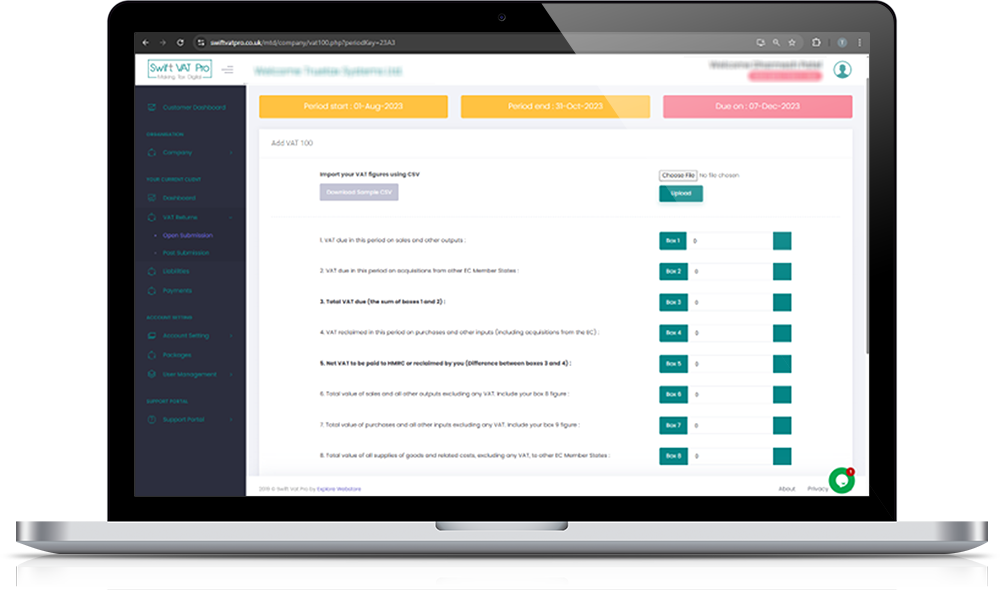
5. Download the sample CSV file provided.
Fill in the required figures from Box 1 to Box 9, then upload the completed Excel file back into the system.

6. Tick the checkbox to confirm the legal declaration, enter the captcha code, and click the “Submit VAT” button.
Advantages of VAT filing online
Digital VAT returns have the following advantages:
- Compliance with HMRC regulations
- Fewer errors compared to manual calculations
- Quicker submission without the need for paper forms
- Clear documentation for accounting or auditing needs
Digital filing streamlines reporting, improves accuracy, and saves time.

Frequently Asked Questions:
Your Questions – Answered ,We’re here to help you with anything VAT-related
What are the steps to file a VAT return with MTD software?
Filing a VAT return through MTD software is straightforward. First, sign in using your Government Gateway ID. Then, connect your MTD-compatible software to HMRC. Review your digital records to ensure all sales and purchase data are accurate.
Select the correct VAT period, fill in the figures for Boxes 1 to 9, and double-check everything before submitting.
Once you confirm the declaration, submit your return. You’ll receive a confirmation message when HMRC successfully receives your VAT return.
Is filing VAT returns digitally required?
Yes, all VAT-registered businesses in the UK must file their returns digitally under the Making Tax Digital (MTD) regulations. This applies regardless of turnover or business type. The goal is to make Tax filing more accurate and efficient while reducing paperwork and human error.
Manual or paper VAT filing no longer meets HMRC requirements unless you’re officially exempt due to specific circumstances, such as age, disability, or limited access to the internet.
Can I use spreadsheets to file VAT returns online?
What happens if I don’t follow the MTD process?
Why choose cloud-based software for VAT filing?
Cloud-based MTD software simplifies and enhances VAT filing. It allows you to access your data anytime, from any device, without installing heavy programs. Your records stay safe through automatic backups, and updates are handled automatically, keeping you in line with the latest HMRC rules. Cloud platforms also support multi-user access, enabling accountants and clients to work together smoothly. It’s a modern, reliable way to handle VAT returns efficiently.