
How to submit a VAT return to HMRC
To submit a VAT return to HMRC, use software that works with Making Tax Digital (MTD). Connect it to your HMRC account, upload your 9 box figures as a CSV or Excel file, check them, and submit. The deadline is 1 calendar month and 7 days after your VAT period ends, and you pay HMRC by that same date.
Last updated: 5 November 2026
Ways to submit a VAT return to HMRC
Almost every VAT-registered business must submit through MTD-compatible software. The old VAT online account form is closed to most businesses (GOV.UK: VAT returns).
| Route | Best for | What it involves |
|---|---|---|
| Bridging software (like Swift VAT Pro) | Businesses that keep records in spreadsheets, or already have VAT figures | Upload your 9 boxes as a CSV or Excel file, then submit to HMRC |
| Full accounting software | Businesses that want bookkeeping, invoicing and VAT in one system | Move your records into the software; it works out and submits the return |
| An accountant or agent | Businesses that want someone else to prepare and file | The agent submits using their own MTD software |
| Exempt from MTD | Only businesses HMRC has agreed are exempt (for example digital exclusion) | Submit the way HMRC tells you when it confirms the exemption |
Not sure which fits? Read Best ways to file VAT online: manual vs MTD software.
How to submit a VAT return with Swift VAT Pro, in 4 steps
Four steps from your spreadsheet to HMRC, with no new accounting system to learn.
Sign up and connect to HMRC
Sign up with just your email for a 7-day free trial, add your company's VAT number, and connect to HMRC with your own HMRC sign-in. Accountants and agents add each client company the same way.
- Email only - no card needed to start.
- Nothing to install - it works in your web browser.
- Your own HMRC sign-in, on HMRC's own page.

Upload your CSV or Excel file
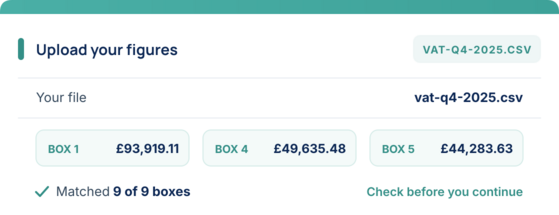
Upload a CSV or Excel (.xlsx) file with rows labelled Box 1 to Box 9. Swift VAT Pro matches your figures to the 9 VAT boxes and shows them to you to check.
- Keep your spreadsheet or bookkeeping software - just export your VAT figures.
- Box 1 to Box 9 matched automatically from your file.
- See the file format in our Getting Started Playbook.
Check your VAT return and submit
Preview the full VAT return, then submit it to HMRC digitally through HMRC's Making Tax Digital VAT API. Submitting needs a paid plan, from £5 a month, which you can choose at any point during your free trial.
- Preview all 9 boxes before you send.
- Sent digitally through HMRC's MTD VAT API.
- Meets the MTD rule that VAT returns are submitted digitally.

Keep track of payments and past returns
See VAT payments and liabilities straight from HMRC, and view, download or print any return you have submitted.
- Payments and liabilities from HMRC.
- PDF copy of every past return.
- HMRC receipt saved for every return.

What you need to submit your VAT return
- Your VAT registration number (9 digits)
- Your own HMRC sign-in (Government Gateway user ID and password)
- Your VAT figures for the period, saved as a CSV or Excel (.xlsx) file
- Your VAT period dates (shown in your HMRC account)
Sign up with just your email for a 7-day free trial, no card needed. Submitting a return to HMRC needs a paid plan, from £5 a month. See the file format in our Getting Started Playbook.
The 9 boxes on a VAT return, explained
| Box | What goes in it |
|---|---|
| Box 1 | VAT due on your sales and other outputs |
| Box 2 | VAT due on goods brought into Northern Ireland from the EU (most businesses enter 0) |
| Box 3 | Total VAT due: Box 1 plus Box 2 |
| Box 4 | VAT you are reclaiming on purchases and other inputs |
| Box 5 | Net VAT to pay HMRC, or to reclaim: the difference between Box 3 and Box 4 |
| Box 6 | Total value of your sales, not including VAT |
| Box 7 | Total value of your purchases, not including VAT |
| Box 8 | Value of goods supplied from Northern Ireland to the EU, not including VAT |
| Box 9 | Value of goods brought into Northern Ireland from the EU, not including VAT |
Boxes 6 to 9 are in whole pounds. Boxes 1 to 5 include pence. If you had no sales or purchases in the period, you still submit a return, with 0 in every box (a "nil return").
HMRC's full guidance: How to fill in and submit your VAT return (VAT Notice 700/12)
VAT return deadlines
The deadline to submit and pay is usually 1 calendar month and 7 days after the end of your VAT period. For quarterly returns:
| VAT period ends | Submit and pay by |
|---|---|
| 31 March | 7 May |
| 30 June | 7 August |
| 30 September | 7 November |
| 31 December | 7 February |
Your own dates are in your HMRC account and in Swift VAT Pro. Different rules apply to the Annual Accounting Scheme and payments on account (GOV.UK: VAT return deadlines).
A late return gets a penalty point, and you get a penalty once you reach the points limit. Paying late can bring penalties and interest (GOV.UK: penalty points for late VAT returns).
More detail: UK VAT return deadlines · VAT penalty points in 2026
How to pay your VAT bill
Submitting the return does not pay HMRC. You pay separately, by the same deadline. Ways to pay include Direct Debit, online or telephone banking, and debit or corporate credit card. Allow time for the payment to reach HMRC (GOV.UK: Pay your VAT bill).
If you pay by Direct Debit, set it up at least 3 working days before you submit your return. If Box 5 shows a refund, HMRC pays it to the bank account it holds for you. In Swift VAT Pro you can see what you owe HMRC and what you have paid, straight from HMRC.
How long does it take?
For our customers, a typical VAT return takes under 10 minutes. Across 758 returns filed through Swift VAT Pro between January 2025 and November 2026, the median time from sign-in to submission was 7.6 minutes. 59% were submitted within 10 minutes.
Tips to be faster: How long does it take to file VAT online?
Made a mistake on a submitted VAT return?
You cannot edit a return after it is submitted. Instead:
- Small errors: correct them on your next VAT return if the net error is £10,000 or less, or up to 1% of your Box 6 figure with a maximum of £50,000, and was not deliberate.
- Larger or deliberate errors: tell HMRC separately, usually with form VAT652.
Submitting your first VAT return
Your first VAT period starts on your effective date of registration, so it can be longer or shorter than later periods. You can reclaim VAT on some costs from before you registered, within time limits. Connect your VAT number to Swift VAT Pro once and the same steps work for every return after that.
Step-by-step: First VAT return after registration
Submitting VAT returns for clients
Accountants and agents add each client company and connect it to HMRC the same way as step 1. You can see every client's returns in one dashboard. See Swift VAT Pro for accountants and agents and the Small Practice, Agent and Enterprise plans on our pricing page.
Questions about submitting a VAT return
Can I still submit a VAT return on the HMRC website?
Can I submit my VAT return from Excel?
When do I pay HMRC after submitting?
Do I have to submit a VAT return if I had no sales?
Do I need an accountant to submit a VAT return?
How do I know HMRC has received my VAT return?
Submit your next VAT return in minutes
Sign up with just your email for a 7-day free trial. Live chat Mon-Sat, 6:30 AM - 7:30 PM, or ask for a callback.